- No extra inbox to check - Everything lands in a single inbox.
- Shortended Emails - Create first name emails for your user’s as a forwarder (e.g. bob@ forwarding to the mailbox bob.smith) or vice versa.
- Simpler setup - No need to create or manage a second account.
- Cleaner - You can use different emails like sales@ info@ without needing to juggle multiple logins.
- Muiltiple destinations - You can send a single email to multiple inboxes.
While email forwarders can be sent to external email addresses such as Gmail, Outlook, etc - Forwarded email deliverability is not always guaranteed - We’d highly recommend to forward this to emails within your domain.
Setting up an Email Forwarder
Create your forwarder
On the page, select Create New Forwarder and enter the following details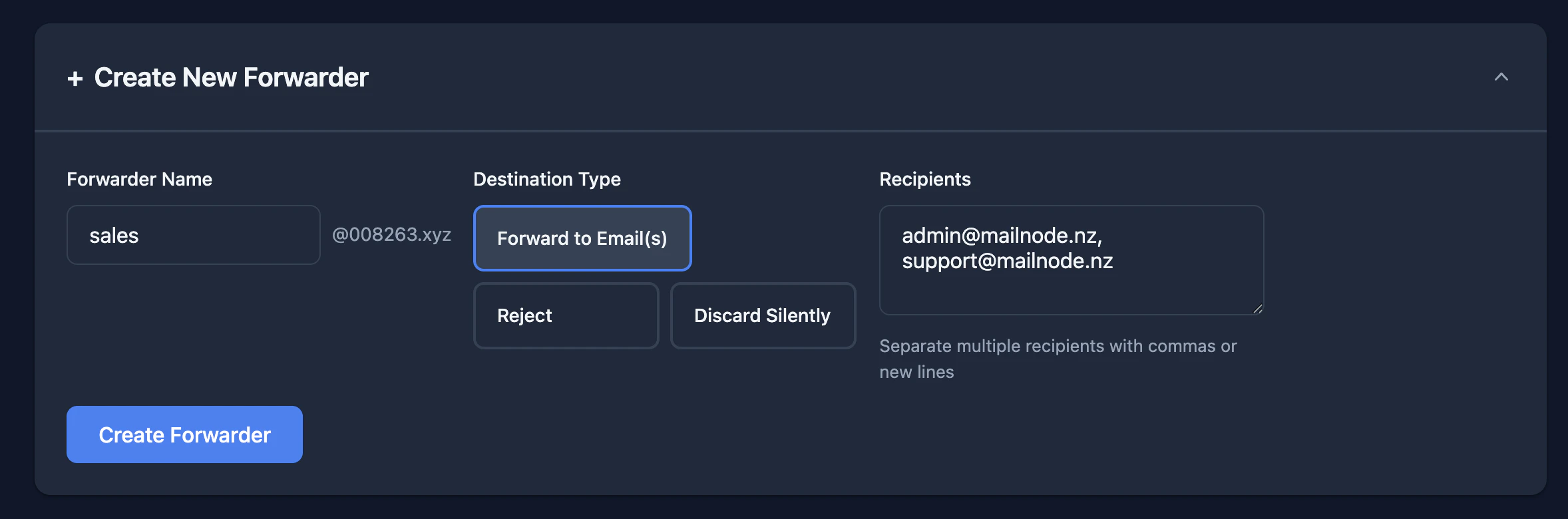
- Alias - This is the name of the email address you wish to create as a forwarder (e.g. sales)
- Destination Type - Here you have three different options
- Forward to email(s) - This is your go to and the most common
- Reject - We would recommend to only use this if you are attempting to block a specific catch-all email that is no longer in use and is recieving spam.
- Discard Silently - Similar to Reject it will stop the email delivering, but doesn’t send a reject to the sender.
- Recipients - If you selected Forward to email(s) this is where you want your Alias to forward to - You can configure up to 50 individual recipients for each Forwarder.